

The Call Routing skill lets your agent cold‑transfer an active call to a specific phone number when certain phrases are spoken. You define simple rules such as:
  • When the bot says “Let me patch you through” → transfer to Dave at +14151112222
  • When the human says “Support” → transfer to Sophie at +12314270677
When a rule matches during the conversation, Fluents immediately transfers the call to the configured number (US 10‑digit numbers), and the AI agent drops off the call.

How it works

With Call Routing enabled:
  • You define one or more conditions in the Configure Call Routing dialog.
  • Each condition specifies:
    • Who says something: the bot (AI agent) or the human (caller)
    • The phrase that must be spoken
    • The recipient name (for your reference)
    • The recipient number (US 10‑digit number)
During a call:
  • If any condition matches:
    • The call is cold‑transferred to the configured number.
    • The caller hears standard ringing while the transfer is attempted.
    • The AI agent is no longer on the line.
  • If the transfer fails (for example, unreachable number), the call ends because it is a cold transfer.
Call Routing can be used with any agent (inbound or outbound) that can place or receive phone calls.

Prerequisites

Before using Call Routing, make sure:
  • Your workspace has at least one telephony provider and numbers configured (so calls can be placed).
  • The target numbers you plan to transfer to are valid US 10‑digit phone numbers.
  • Your agent’s prompt is written to say the exact phrases you configure for any “bot says” rules.

Enable Call Routing on an agent

  1. Go to Agents and select your agent.
  2. On the Basic Information tab, find Choose Skills.
  3. Click Call Routing to add the skill.
  4. The Configure Call Routing dialog opens.
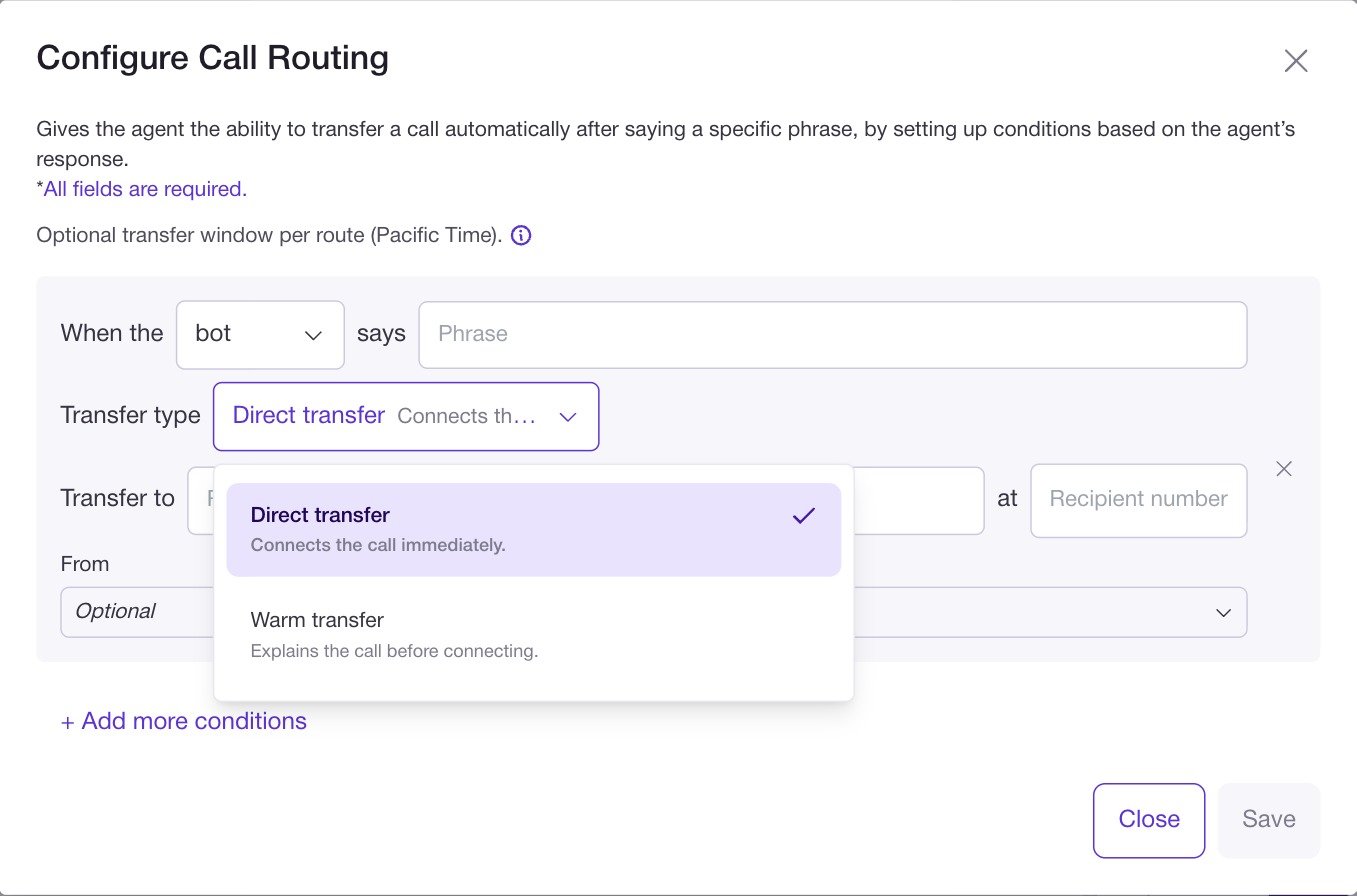
Configure Call Routing conditions

In the Configure Call Routing dialog, each condition has two parts:
  1. Trigger phrase
  2. Transfer destination
You can add multiple conditions using + Add more conditions.

1. Trigger phrase

For each condition:
  • Choose who must say the phrase:
    • bot – the AI agent
    • human – the caller
  • Enter the Phrase that must be spoken.
Behavior:
  • For bot:
    • Matching is exact.
      The agent must say exactly the phrase you configure here.
    • You should ensure the same wording appears in your Agent Prompt so the bot naturally says it at the right time.
  • For human:
    • The phrase match is more flexible, because real callers may phrase things differently.
    • You can keep phrases shorter and more generic (for example, “support”) so they are more likely to match.
Because bot rules use exact matching, they are more predictable and give you tighter control over when transfers happen.
human rules provide more flexibility but can be less precise.

2. Transfer destination

For each condition, set where to send the call:
  • Transfer to – a descriptive Recipient Name (for example, “Dave”, “Support”, “Sales queue”).
  • at – the Recipient number, a valid US 10‑digit phone number.
You can reuse the same number in several conditions if needed. Once a condition is satisfied during a call, Fluents immediately initiates the transfer to this number. Click Save in the dialog when you are done, then save the agent.

Caller experience

With Call Routing configured, a typical flow might look like:
  • Bot‑triggered transfer
    1. The agent handles the initial conversation.
    2. Once it determines a human should take over, it says something like:
      “Let me patch you through” (exact phrase configured for a bot rule).
    3. The rule matches and the call is transferred to the target number.
    4. The caller hears ringing while the transfer goes through.
    5. The AI drops off; the human picks up and continues the conversation.
  • Human‑triggered transfer
    1. The caller says a key word or phrase, such as “support” or “sales”.
    2. A human rule matches that phrase.
    3. The call is transferred to the configured destination as above.
If the transfer cannot be completed (for example, invalid number or network issue), the call ends because it is a cold transfer.

Best practices

  • Use bot‑triggered transfers for reliability
    Since bot phrases are exact‑match, you control exactly when routing happens. Write the same phrase in your Agent Prompt so the agent uses it consistently.
  • Keep human phrases simple
    For human triggers, use short, clear words that are likely to appear in many variations of the request (for example, “support”, “sales”).
  • Test all routes
    Use Test Call Agent and say the trigger phrases (or let the bot say its trigger phrase) to confirm:
    • The correct route fires.
    • The call rings on the right number.
    • The human receiving the call understands who is being transferred.
  • Document destinations for your team
    Use clear recipient names (for example, “Support L1”, “Billing”, “On‑call manager”) so others on your team can understand and maintain the routing logic.

Where to go next