> ## Documentation Index
> Fetch the complete documentation index at: https://docs.fluents.ai/llms.txt
> Use this file to discover all available pages before exploring further.
# How-To: Agent
> A step-by-step guide to creating a personalized Agent that integrates voice, behavior, and context for seamless AI-powered interactions.
# Agent: Building an Intelligent Voice Experience
An **Agent** is the core unit in Fluents.ai. It combines voice, behavior, and context to power smooth, dynamic, and personalized AI conversations.
***
## Basic Settings
Start by configuring your Agent’s identity and default behavior.
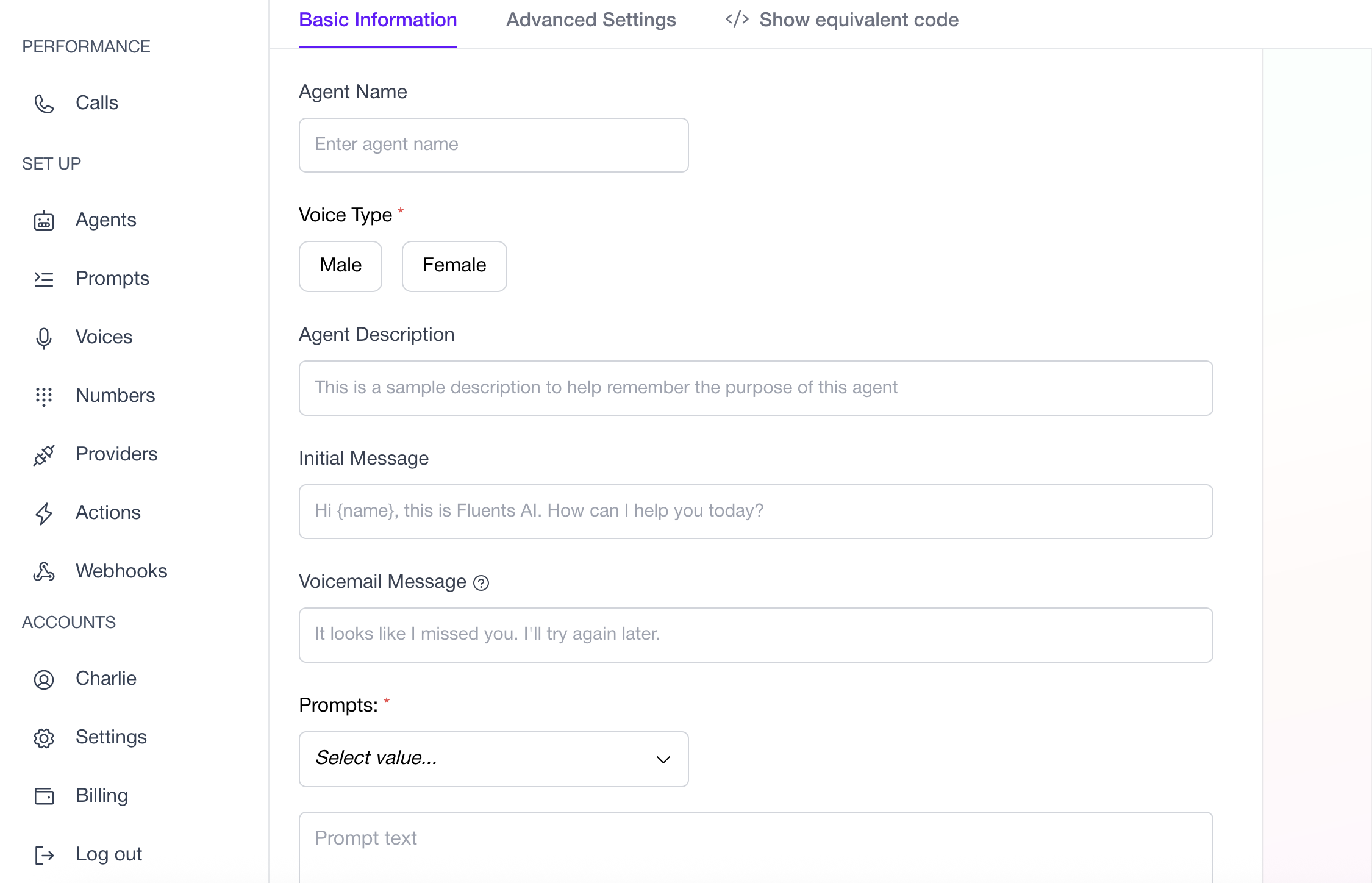 * **Agent Name** — A recognizable name for your Agent.
* **Voice Type** — Select the Agent’s tone (male or female).
* **Agent Description** — Internal description of the Agent’s purpose or use case.
* **Voicemail Message** — What the Agent should say if it reaches voicemail.
* **Predefined Prompt** — Choose a saved prompt from your Prompt Library.
* **Custom Prompt** — Add or edit a custom prompt directly.
***
## Advanced Settings
Fine-tune your Agent’s intelligence, responsiveness, and integrations.
* **Agent Name** — A recognizable name for your Agent.
* **Voice Type** — Select the Agent’s tone (male or female).
* **Agent Description** — Internal description of the Agent’s purpose or use case.
* **Voicemail Message** — What the Agent should say if it reaches voicemail.
* **Predefined Prompt** — Choose a saved prompt from your Prompt Library.
* **Custom Prompt** — Add or edit a custom prompt directly.
***
## Advanced Settings
Fine-tune your Agent’s intelligence, responsiveness, and integrations.
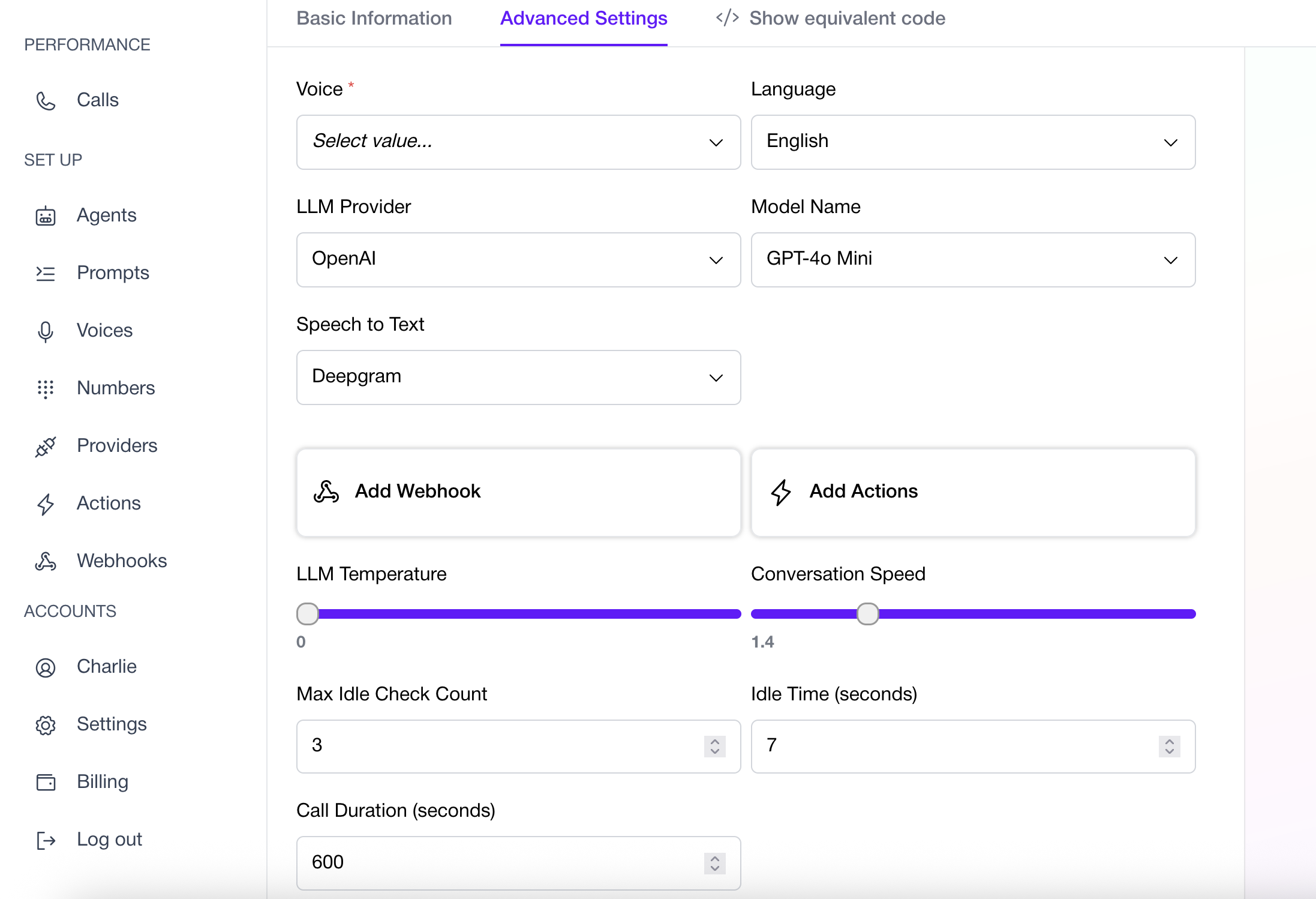 * **Select a Voice** — Pick a specific voice from your created voice assets.
* **Model Language** — Define the language your Agent will use.
* **LLM Provider** — Choose your preferred large language model provider (e.g., OpenAI).
* **Model Name** — Options include:
* GPT-4
* GPT-4 Turbo
* GPT-4 Omni
* GPT-4 Omni Mini
* GPT-3.5
* GPT-3.5 Turbo\
*Note: Latency and performance may vary by model.*
* **Speech-to-Text Provider** — Select the transcription provider for incoming speech.
* **Webhooks** — Add one or more webhooks to stream conversation data in real time.
* **Actions** — Assign specific Actions the Agent can perform (e.g., send SMS, update lead, transfer call).
* **LLM Temperature** — Adjust response style:
* Lower = more deterministic.
* Higher = more creative.
* **Conversation Speed** — Controls how quickly the Agent interrupts:
* Lower = slower to interrupt.
* Higher = faster to respond (may overlap the user).
* **Max Idle Check Count** — Maximum number of times the Agent checks if the user is still present before ending the call.
* **Idle Time (seconds)** — Delay before checking if the caller is still there.
* **Call Duration (seconds)** — Maximum length of the call.
***
## Next Steps
* Explore the API: [Create Agent](../../api-reference/agents/create-agent)
* Learn more: [Actions Guide](./actions)
* **Select a Voice** — Pick a specific voice from your created voice assets.
* **Model Language** — Define the language your Agent will use.
* **LLM Provider** — Choose your preferred large language model provider (e.g., OpenAI).
* **Model Name** — Options include:
* GPT-4
* GPT-4 Turbo
* GPT-4 Omni
* GPT-4 Omni Mini
* GPT-3.5
* GPT-3.5 Turbo\
*Note: Latency and performance may vary by model.*
* **Speech-to-Text Provider** — Select the transcription provider for incoming speech.
* **Webhooks** — Add one or more webhooks to stream conversation data in real time.
* **Actions** — Assign specific Actions the Agent can perform (e.g., send SMS, update lead, transfer call).
* **LLM Temperature** — Adjust response style:
* Lower = more deterministic.
* Higher = more creative.
* **Conversation Speed** — Controls how quickly the Agent interrupts:
* Lower = slower to interrupt.
* Higher = faster to respond (may overlap the user).
* **Max Idle Check Count** — Maximum number of times the Agent checks if the user is still present before ending the call.
* **Idle Time (seconds)** — Delay before checking if the caller is still there.
* **Call Duration (seconds)** — Maximum length of the call.
***
## Next Steps
* Explore the API: [Create Agent](../../api-reference/agents/create-agent)
* Learn more: [Actions Guide](./actions)